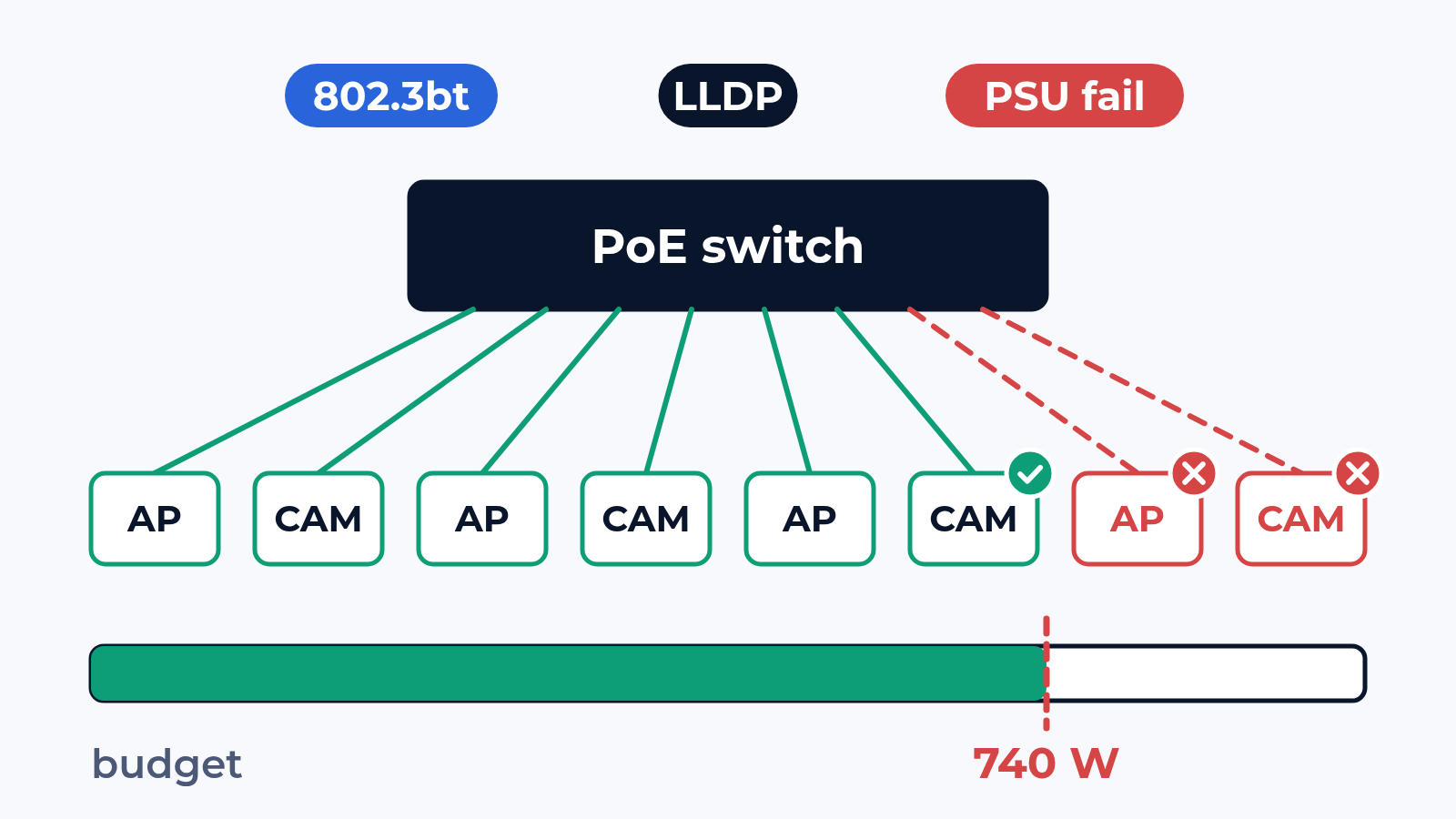
A PoE switch datasheet has two lines a buyer reads: "PoE+ on all 48 ports" and a power budget, for example 740 W. 48 ports at 30 W make 1440 W. Both lines are honest, they just do not hold at the same time. The buyer counts cameras and access points on a floor plan. The switch counts watts, reserves them per class and decides which port goes dark when the sum runs out. We test that arithmetic with a load on every port, data through the same ports and a power supply pulled out halfway through.
The bench
The switch, injector or midspan sits on the CloudLAB bench with its access ports cabled to emulated powered devices. Each one is a programmable load: it answers detection and classification as a real device of class 0 to 8, asks for power over LLDP and draws a set current or a profile over time. Data passes through each load to a generator port, so watts and frames are counted on the same port in the same second. Real devices join where their own behaviour decides the result: access points from the Wi-Fi bench, an IP camera, a desk phone.
The configuration is yours: allocation by class, by LLDP request or by measured draw, port priorities, the PSU set, perpetual and fast PoE, the firmware. Traffic is what these ports carry on site: camera video, voice, AP uplinks. Forwarding as such is in how we test Ethernet switches; here the switch is judged as a power source.
What we check
- Detection and classification per port: 802.3af, 802.3at and 802.3bt classes 0 to 8, single- and dual-signature devices, a wrong signature that must stay unpowered
- LLDP negotiation: the device asks for more or less than its class, what the switch grants and how long the grant takes
- Full budget: every port loaded to its class maximum, watts at the switch port and at the device end, the total against the datasheet
- Budget exhausted: the next device plugged in, which port the switch refuses or sheds, and whether the configured priority decides it
- Degraded supply: one of 2 PSUs pulled under full load, the new budget, the ports dropped and how fast; then the PSU back and the time to power them again
- Inrush and overload: start-up current per class, a device that draws above its class or shorts, the cut-off time, the neighbour ports staying up
- Data under power changes: frame loss and latency per port while 24 devices power up at once, a port is shed, the load swings
- Reboot with perpetual and fast PoE: power on each port through a warm restart and a firmware upgrade, the gap in milliseconds, how soon a cold switch feeds its ports
What usually breaks
The budget. In a typical project a 48-port switch with 740 W from 2 PSUs allocates by class: each class 4 AP reserves 30 W and draws 13 to 17 W. Port 25 is refused power at a real draw near 400 W. Allocation by LLDP request (18 W per AP) lets 41 ports in. Then one PSU is pulled: the budget halves, the switch sheds 21 ports in under 2 seconds, 3 of them with cameras marked critical. Priority was set per port, shedding went by port number.
The access point. An AP needs 30 W at the device for all its radios and sits on a PoE+ port. 25.5 W arrives, the AP boots in a reduced mode and turns one radio off. The switch log shows the port up and powered, while the coverage plan assumed every radio.
The upgrade. Perpetual PoE is on and holds through a warm restart. A firmware upgrade takes another path: the ports lose power for 3 seconds, every camera reboots and each one records nothing for about 90 seconds. A test with 40 cameras attached shows it, a test on an empty switch does not.
What is in the report
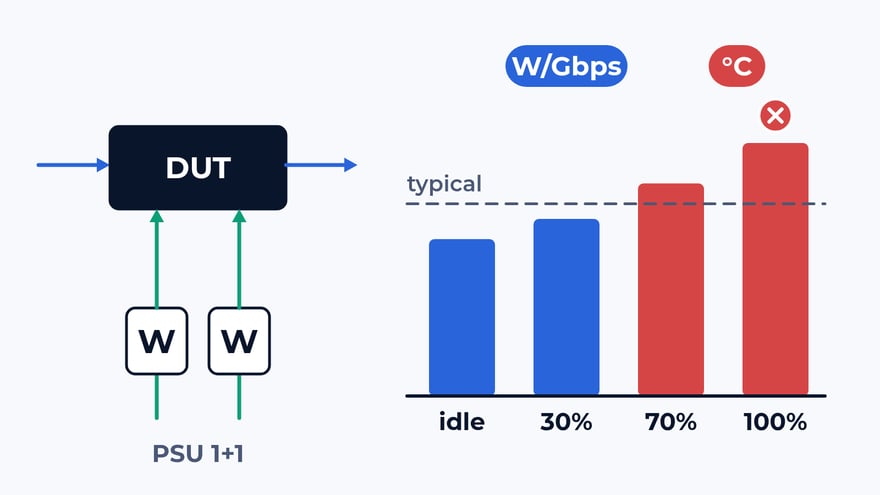
A per-port table: class detected, power requested over LLDP and granted, watts at the switch and at the device, the verdict per item. The budget curve port by port, with the point where the switch refuses and the shedding order for each PSU state. Power and data gaps per event (PSU loss, overload, restart, upgrade) in milliseconds, with frame loss and latency per port. The switch's own watts per Gbps are a separate item, see power under load. For a shortlist, one table for all candidates: "PoE+ on all ports" turns into the number of devices each switch really feeds.
Where to start
Send us the switch models, the list of devices per switch with their classes and the firmware you plan to run. We answer with a draft test plan: the items, the bench layout and the dates. The report is yours to keep and to show to the vendor. Write to us or look at what else the bench does.
 Alexander Zemskov
5 min read
Alexander Zemskov
5 min read
 Alexander Zemskov
5 min read
Alexander Zemskov
5 min read