The provider sold 1 Gbps. The Y.1564 acceptance and an RFC 2544 run passed at line rate with zero loss, a speed test from the office shows over 900, and the nightly backup to the second data centre runs at 28 Mbps. Nobody is lying. The speed test talks to a server a few milliseconds away over many streams, the UDP run has no window to fill, and the backup is one TCP connection over 92 ms of RTT. RFC 6349 measures the third case, the one users complain about.
The bench
RFC 6349 needs two TCP hosts that let us set the window, log every retransmission and timestamp the segments. In CloudLAB the hosts are ports of the traffic generator with hardware TCP stacks up to 100 GbE; on a live circuit we put test hosts at both ends. Between them sits the path: a customer circuit, a device under test, or a WAN emulator set to the RTT and loss of the target network, from 1 to 300 ms and from 0 to 1%.
Before the path goes in, the two hosts are connected back to back and must fill the link with zero retransmissions. A laptop with a 64 KB default window measures its own limit and calls it the network.
What we check
- Path MTU: probing per RFC 4821 in each direction, ICMP not trusted since firewalls drop it; every later run takes its MSS from it
- Baseline RTT: at least a minute of samples on the idle path, minimum, average and maximum
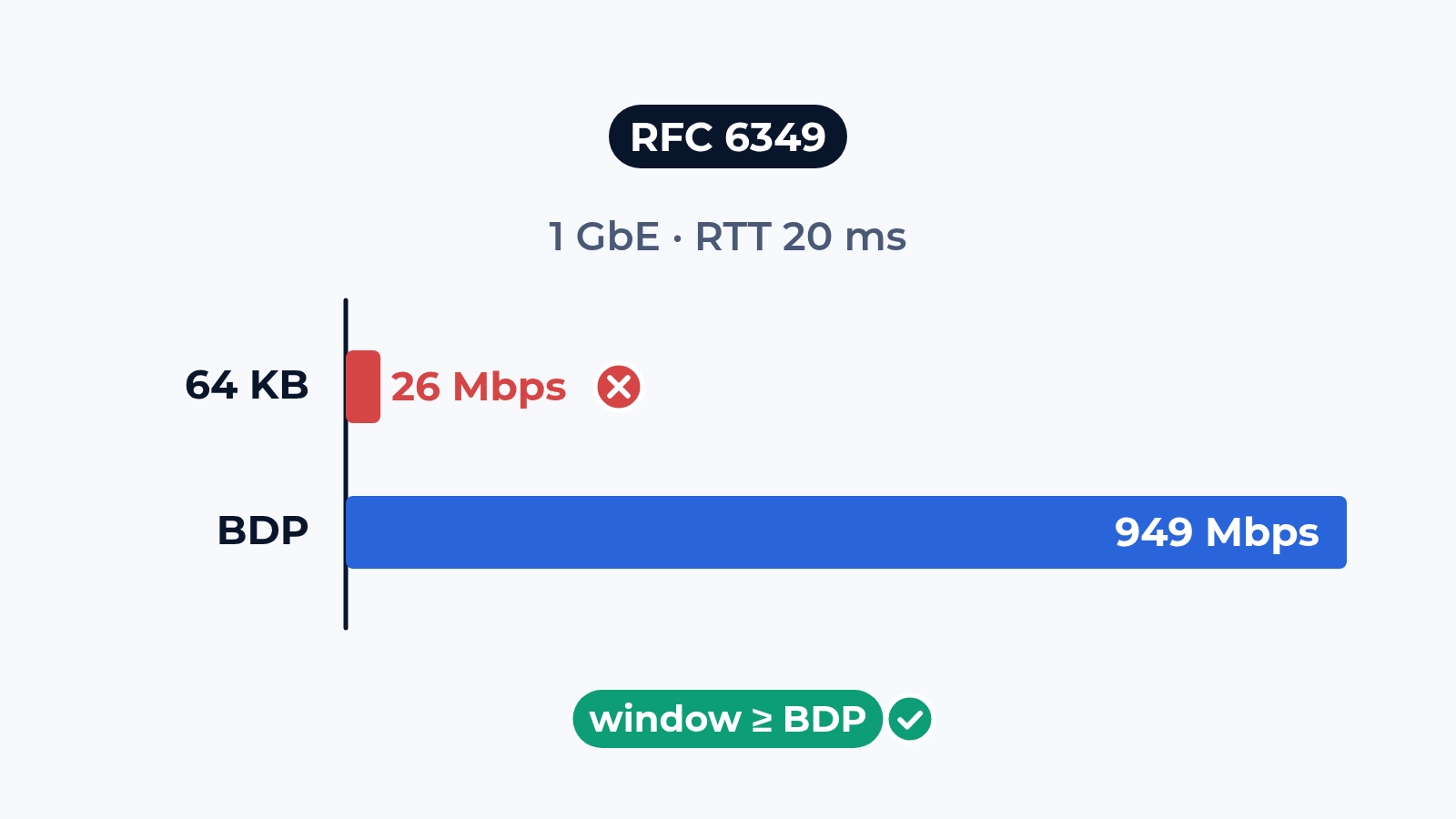
- Bottleneck bandwidth: a layer 2/3 run at the MTU found, zero loss required; with the RTT it gives the bandwidth-delay product, 2.5 MB for 1 Gbps at 20 ms
- One connection with the window at the BDP: 30 seconds, three runs, the number a single backup stream gets
- Several connections: 4, 8 or 16 whose windows add up to the BDP; the gap between 1 and N points at a per-flow limit
- Both directions: each alone, then both at once, to catch an asymmetric shaper or ACK compression
- Three metrics per point: TCP Transfer Time Ratio against the ideal, TCP Efficiency as the share of bytes sent once, Buffer Delay as RTT growth under load
- Devices that touch TCP: a firewall, a shaper or an SD-WAN edge between the hosts, measured with and without it
One metric alone does not name the cause, so we read all three. Efficiency below 100% means loss on the path. A high Buffer Delay with no loss means a queue in front of the bottleneck. A Transfer Time Ratio in the tens with clean metrics means the host window.
What usually breaks
The window. A typical case: an international 1 Gbps circuit, 92 ms RTT, a BDP of 11.5 MB, and a backup server that caps its window at 320 KB. 320 KB over 92 ms is 28 Mbps. The ticket travels between the carrier and the IT team for weeks. With the window at the BDP and 8 connections the same circuit carried 905 Mbps, and the fix was two lines in the server settings.
Second: loss too small to notice. A TCP Efficiency of 99.6% looks clean in a report. At 20 ms RTT it is enough to cut throughput by two thirds, because TCP slows down after every loss and needs many round trips to recover. This is where the argument between the carrier and the customer usually ends: the retransmissions are in the capture, with the time and the direction.
Third: the queue. The shaper at the provider edge has a deep buffer. Throughput looks fine, while the RTT grows from 20 ms idle to 37 ms under load, a Buffer Delay of 85%. Voice on the same circuit feels every one of those 17 ms.
What is in the report
One table per direction: throughput per connection count in Mbps and as a share of the maximum achievable (949 Mbps on 1 GbE at 1500 B MTU), the three metrics, and the MTU and RTT they were taken at. Host settings: TCP stack, window scaling, SACK, offloads. A capture behind each row. For each failed point one line of diagnosis: host window, loss on the path or queueing. We sell the test, the carrier sells the circuit, so both sides read the same numbers.
Where to start
Send us the path: the two endpoints, the link rate, the RTT if you know it and what has to move over it. We answer with a draft test plan: the runs, the windows, the connection counts and the dates. The report is yours to keep and to show to the carrier. Write to us or look at what else the bench does.
 Alexander Zemskov
4 min read
Alexander Zemskov
4 min read
 Alexander Zemskov
4 min read
Alexander Zemskov
4 min read