A vFirewall datasheet says 20 Gbit/s. The figure comes from the vendor's host: SR-IOV, pinned cores, a NIC picked for the test. Your platform team builds hosts to its own standard, often with virtio and a vSwitch, and in a typical project the same image gives 6 Gbit/s there. A cluster is sized from throughput per vCPU on your host, and that is the number we measure.
The bench
The function runs on the lab hypervisor, KVM or VMware, or as a CNF on our Kubernetes cluster. The host follows your platform standard: vCPU count and the pinning map, memory and huge pages, the NUMA node, the NIC model and its queue count. The image or the Helm chart and the production config are yours. A function that lives only in your tenant or cluster is reached over a dedicated link.
The load comes from 2 sides. L2-3 generator ports at 100G send frames at line rate, down to 64 bytes, over DPDK and SR-IOV paths. L4-7 engines at 200G and more replay the application mix with sessions and TLS. Host counters run for the whole test: load per vCPU, NIC drops per queue, memory. The run itself follows our load and performance method.
What we check
- Per vCPU: Gbit/s on your application mix and pps at 64 bytes for each vCPU count in the plan, with latency p50 and p99 at fixed loads
- Datapath: the same image and the same traffic on virtio, then on SR-IOV or DPDK, and the gap in gigabits and in cores
- Placement: pinned against floating cores, the NIC on the local and on the remote NUMA node, huge pages on and off
- Ceiling: the load where the function stops growing, and the resource that ran out first: cores, NIC queues or memory
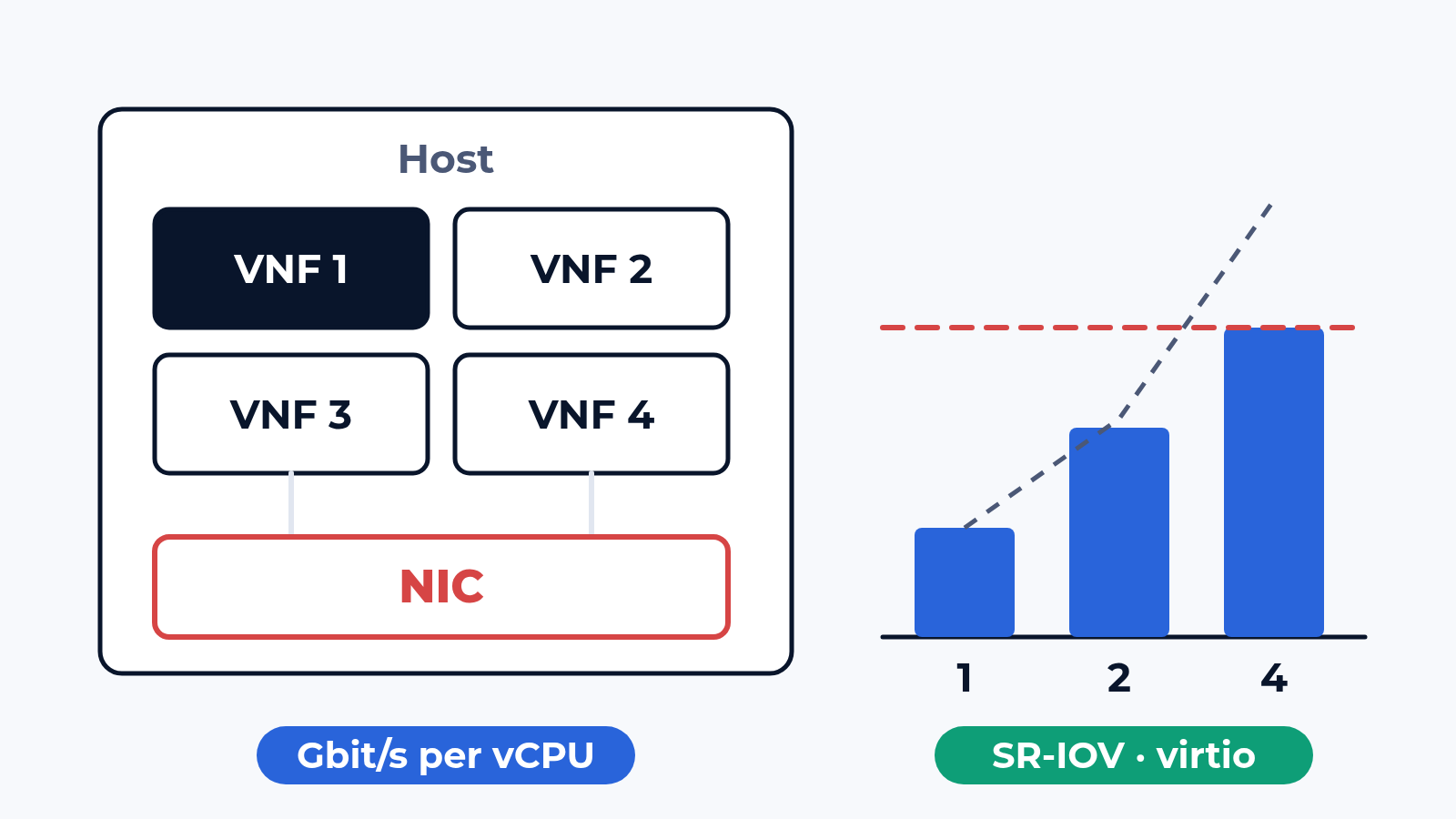
- Scale-out: 1, 2 and 4 instances on one host, then across hosts, against a straight line from the first instance
- Noisy neighbour: a second workload started on purpose on the same cores, cache and NIC, and the throughput drop of the function in %
- Events under load: live migration, restart, pod reschedule, node drain, each timed as a loss window from the last packet to the first one back
Each item has a pass criterion from your design, set before the first packet. The other classes, up to cloud services and web portals, are on the cloud and NFV page.
What usually breaks
The datapath. With virtio every packet costs host CPU in the software switch. In the project from the first paragraph the delivered host gave 6 Gbit/s with 2 vCPUs at 100 %. The same image on the same host with SR-IOV gave 17 Gbit/s. Sized from the first run, the cluster would have needed almost 3 times the hosts.
NUMA. The NIC sits in a PCIe slot of socket 1, the scheduler puts the VM on the cores of socket 0, and every packet crosses between sockets. Throughput drops, latency spreads, and nothing inside the VM shows why. Pinning the vCPUs to the NIC's socket cures it, and the pinning map goes into every report.
The host NIC. A typical scale-out run: 1 instance gives 6 Gbit/s, 2 give 11.5, 4 give 17, where a straight line would promise 24. The host NIC and the cores the instances share set the ceiling. More instances on that host add vCPUs and almost no gigabits; the design needs a second card or a second host.
What is in the report
A result table per run with the host profile in its header: hypervisor and its build, server and CPU model, vCPU count and pinning map, NUMA node, NIC model, queues and datapath. A gigabit figure never appears without that header. Below it: Gbit/s and pps per vCPU per datapath, the ceiling and the resource behind it, the scale-out factor from 1 to N instances, the noisy-neighbour drop in %, the loss window per event in milliseconds. Engine statistics, host counters, captures and config exports are attached. A new hypervisor build, NIC driver or image version gets a rerun of the same items and a diff per KPI. The image can stay on the bench between releases as a hosted DUT, so a rerun needs no new upload.
Where to start
Send us the image, the host profile you plan to run it on and your traffic mix. We answer with a draft test plan: the items, the bench layout and the dates. The report is yours to keep and to show to the vendor. Write to us or look at what else the bench does.

 Alexander Zemskov
5 min read
Alexander Zemskov
5 min read