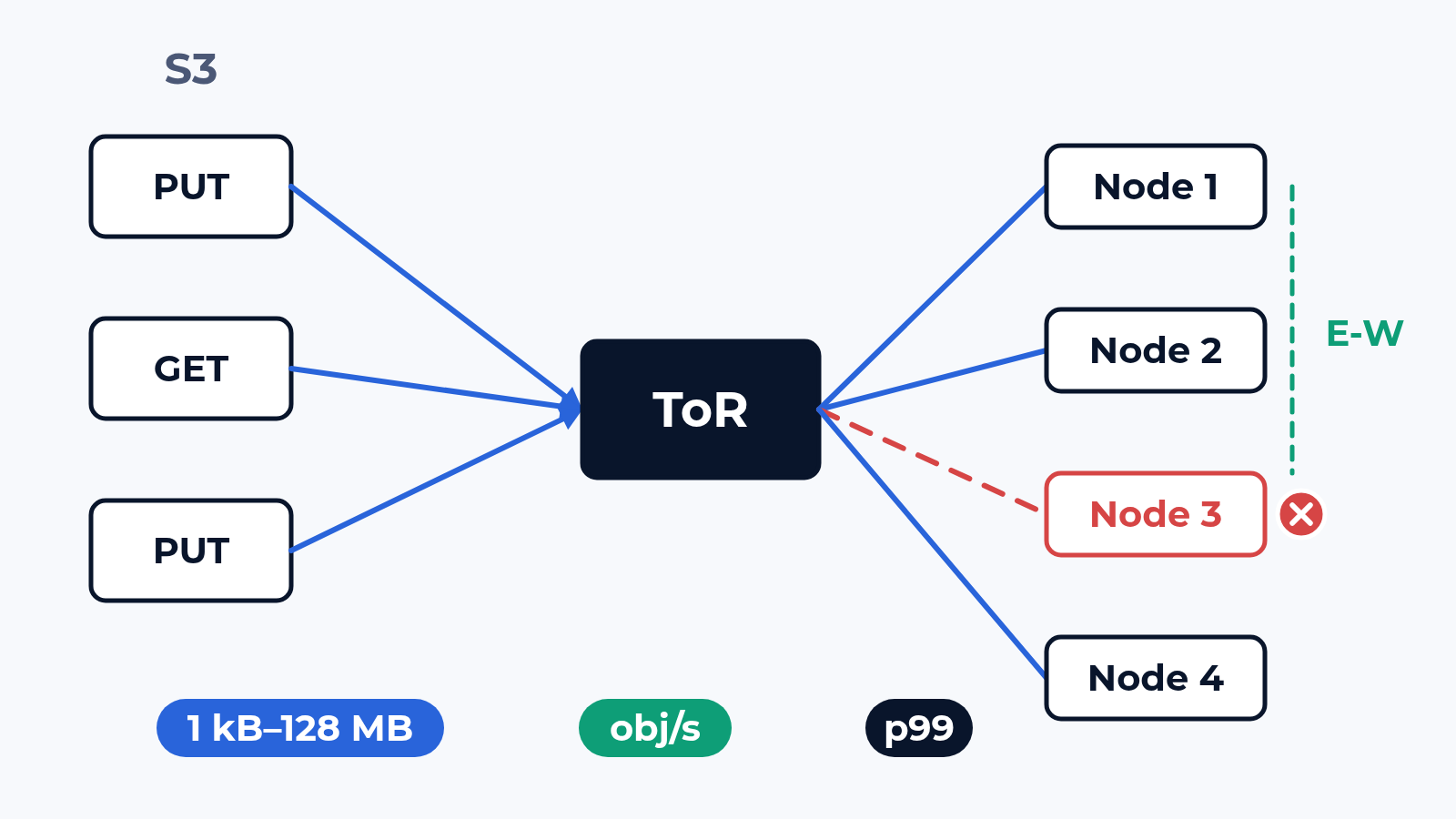
An S3 cluster datasheet gives one figure in GB/s. It was taken with large objects, a few clients and every node healthy. Your application writes, for example, 16 kB thumbnails from a few hundred connections, and one day a node goes down. At 16 kB the cluster hits its request ceiling long before its uplinks fill up. We measure what the application feels: objects per second and p99 latency per object size, before a failure and through it.
The bench
Bench hosts act as distributed S3 clients and drive your profile: PUT, GET and the mix, object sizes from 1 kB to 128 MB as your access logs show them, your connection count, multipart for large objects. The cluster is yours: 3 to 8 nodes in the rack or on the lab hypervisor, an S3-compatible system such as RustFS on bench hosts, or a cluster in your lab reached over a dedicated link.
The nodes sit on 25G uplinks (breakout from 100G) behind the ToR with your config. Erasure coding and replication move data between nodes, so switch counters are read per port for the whole run, with client traffic kept apart from east-west.
What we check
- PUT and GET per object size from 1 kB to 128 MB: objects per second for small sizes, MB/s for large ones, p50 and p99 at every step
- Client scaling: connections added step by step until p99 crosses your criterion; that knee is the capacity to plan with
- Mixed load: GET and PUT in your ratio, held for hours, so that the cluster's own background work falls inside the run
- LIST and DELETE on a bucket filled to the object count you expect in a year, while GET and PUT continue
- Multipart: part size, parallel parts, time to complete a 128 MB upload, and what an aborted upload leaves behind
- East-west: bytes between nodes per byte written, next to the client traffic on the same 25G port
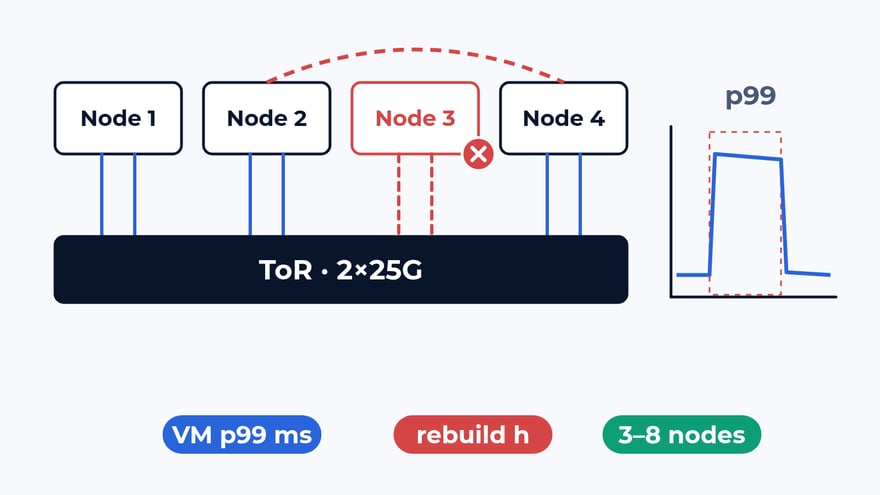
- Failures: a node, an uplink or a NIC port taken down under load, timed from the last completed request to the first one back
- Rebuild: the time to restore full redundancy with clients at full load, and p99 until it finishes
The storage page lists this class next to arrays, HCI and backup. The network in front of a block array, with incast and PFC, has its own post: how we test storage networks.
What usually breaks
Small objects. In a typical project the cluster met its GB/s figure at 16 MB, then got 16 kB objects. PUT stopped near 4,000 per second, p99 went from 15 ms to 200 ms, and the uplinks stayed under 1 Gbps. The limit sat in metadata and disk sync on the nodes. A bandwidth graph points at nobody; objects per second against p99 per size points at the right team.
East-west on the client uplink. With erasure coding the receiving node cuts each object into shards and sends most of them to its neighbours. With an example layout of 4 data and 2 parity shards, every 1 GB written by clients adds about 1.25 GB between nodes. On the receive side of each uplink client PUTs meet those shards, and a cluster sized for client traffic alone runs out of port first.
Rebuild under load. A node goes down, its objects are read in degraded mode, and the cluster rebuilds them over the uplinks the clients use. In a typical acceptance table that is 2 lines: rebuild of one node under full client load 6 h against a design of 4 h, p99 GET for 1 MB objects 35 ms before the event and 180 ms until the rebuild finished. Whether to accept that, slow the rebuild or add uplinks is your call, made before production.
What is in the report
Objects per second, p50 and p99 per object size and operation: PUT, GET, mixed, LIST, DELETE, multipart. The connection count where p99 crosses your criterion. Client and east-west traffic per uplink from the switch counters. Every failure with its gap, rebuild time and p99 through the rebuild. Request logs, node and switch counters, the cluster and ToR config of every run with the software version. The storage vendor, the network team and the application owner read the same table.
Where to start
Send us the cluster layout, the node count and a week of access statistics: object sizes, the GET and PUT ratio, the client count. We answer with a draft test plan: the items, the bench layout and the dates. The report is yours to keep and to show to the vendor. Write to us or look at what else the bench does.
 Alexander Zemskov
4 min read
Alexander Zemskov
4 min read
 Alexander Zemskov
5 min read
Alexander Zemskov
5 min read