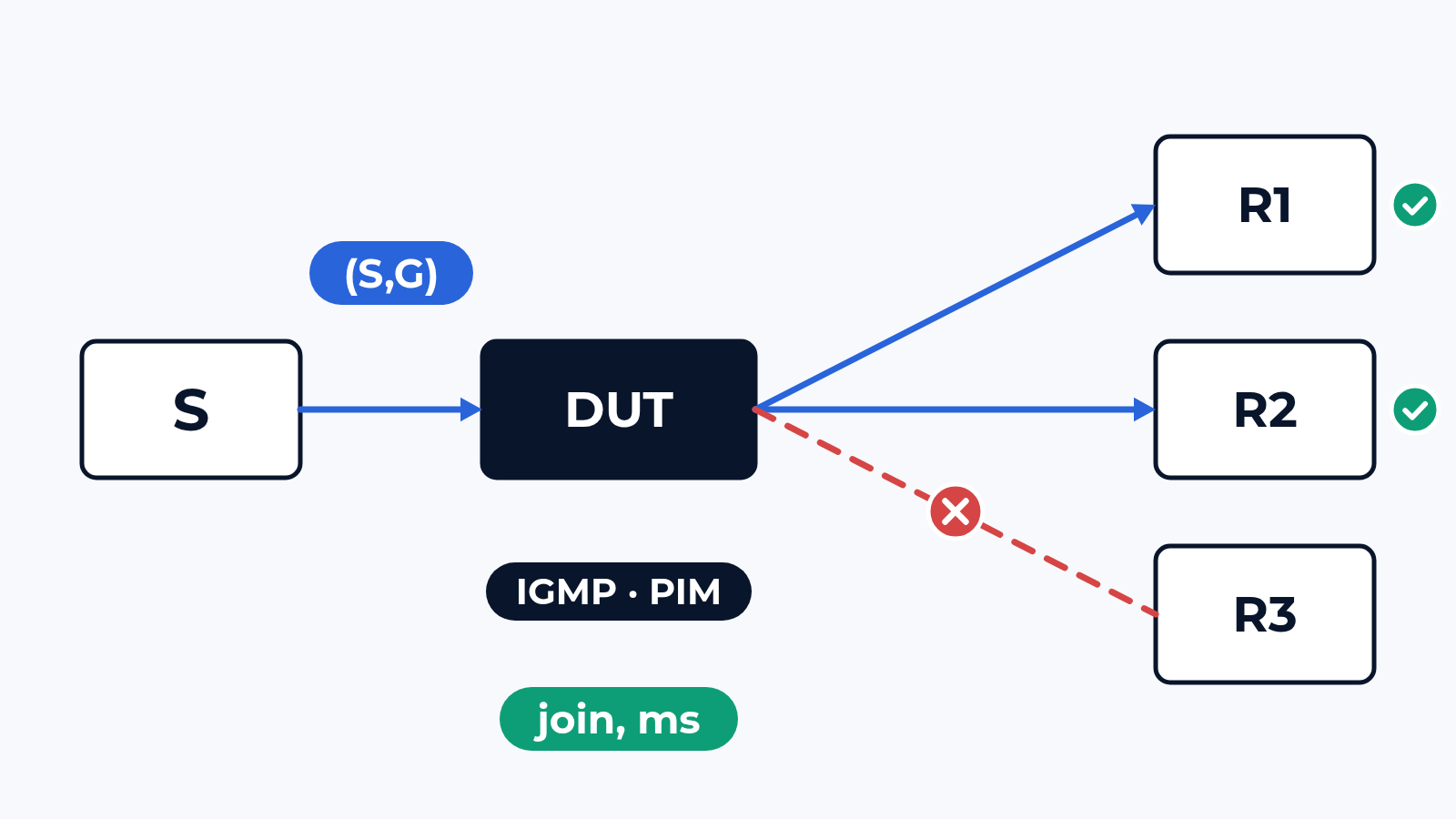
A router datasheet says "PIM-SM, PIM-SSM, IGMPv3, MLDv2, 8K multicast routes". Every line names a feature the box has. None of them tells you how many milliseconds pass from a receiver's join to its first packet, how many (S,G) entries stay in hardware, or what receivers get while the tree is rebuilt after a failure. We measure those numbers for every receiver.
The bench
The device under test sits on the CloudLAB bench on 1G, 10G or 100G ports (400G and faster per project): a router pair or a core switch, or an access switch with IGMP snooping. The generator emulates both ends of the tree: sources sending into the groups of your plan, receivers behind every egress port joining and leaving with IGMPv2 or v3, MLDv1 or v2. Upstream, emulated PIM neighbours and OSPF, IS-IS or BGP peers give the box a unicast table, so the RPF check works on real routes. Every stream carries sequence numbers and timestamps, and each receiver reports its own first packet, loss and duplicates.
The design comes from your config export: RP placement (static, BSR or anycast RP), the SSM range, PIM and IGMP timers, snooping and querier settings. Channel change as a viewer sees it is in the video QoE post; this one is about the network underneath.
What we check
- Join and leave latency: from the report to the first packet on that port, from the leave to the last one; one receiver, then hundreds joining in the same second
- Scale: groups and (S,G) entries added step by step until a joined group gets no traffic or forwarding drops from hardware to the CPU
- Replication: one stream copied to every egress port next to unicast; rate and latency of each copy
- Tree convergence: a link on the RPF path pulled, an upstream router lost; the outage per receiver next to the unicast reconvergence time
- Duplicates: packets that arrive twice while the old and the new path both forward, after a failure and at the switch from the shared tree to the source tree
- RP failure: running flows, new receivers and new sources until the backup RP takes over
- L2 snooping: groups per port, flooding of unknown multicast, fast leave, the querier lost or moved to another switch
RFC 3918 gives the method for join delay, group capacity and forwarding rate; RFC 5180 leaves IPv6 multicast out, so MLD goes in as a separate RFC 3918 block. Failures follow our failover method, pass criteria come from your design.
What usually breaks
The hardware table. In a typical project the datasheet said 8K multicast routes and the design team read it as 8,000 channels. With SSM and 4 sources per channel the box ran out of entries at 2,000 channels. Channel 2,001 had IGMP state and a PIM join upstream; its traffic reached the box and went nowhere. No log line, no alarm, only a per-receiver check shows the dark groups.
Unicast first, multicast later. A link on the RPF path fails, unicast reconverges in 200 ms, and in a typical run the receivers stay dark 2.5 s longer: the box rebuilds 1,500 (S,G) entries one by one after the route change. On a LAN with 2 upstream routers the reverse happens: both forward until the assert settles it, and receivers count duplicates. A video decoder hides that; a market data feed does not.
The querier. An access switch with snooping and no querier on the VLAN works for about 4 minutes after a join. Nobody sends queries, nobody answers them, the membership timer (260 s at default timers) runs out and the switch prunes the port. The stream stops, and the ticket says "intermittent". On the bench it is a step at 260 s in the receiver timeline.
What is in the report
Join and leave latency per receiver as percentiles, against the join rate. The scale limit: the last group that carried traffic and the point where forwarding left hardware. For each failure: outage and duplicates per receiver, next to the unicast convergence time. The RP failover timeline. Snooping tables from the switch next to what each receiver got. The config export and the settings of the emulated sources, receivers and neighbours, so the vendor can repeat any item.
Where to start
Send us the device models, the multicast design (RP, SSM range, group count) and the config export. We answer with a draft test plan: the items, the bench layout and the dates. The report is yours to keep and to show to the vendor. Write to us or look at what else the bench does.
 Alexander Zemskov
4 min read
Alexander Zemskov
4 min read
 Alexander Zemskov
5 min read
Alexander Zemskov
5 min read