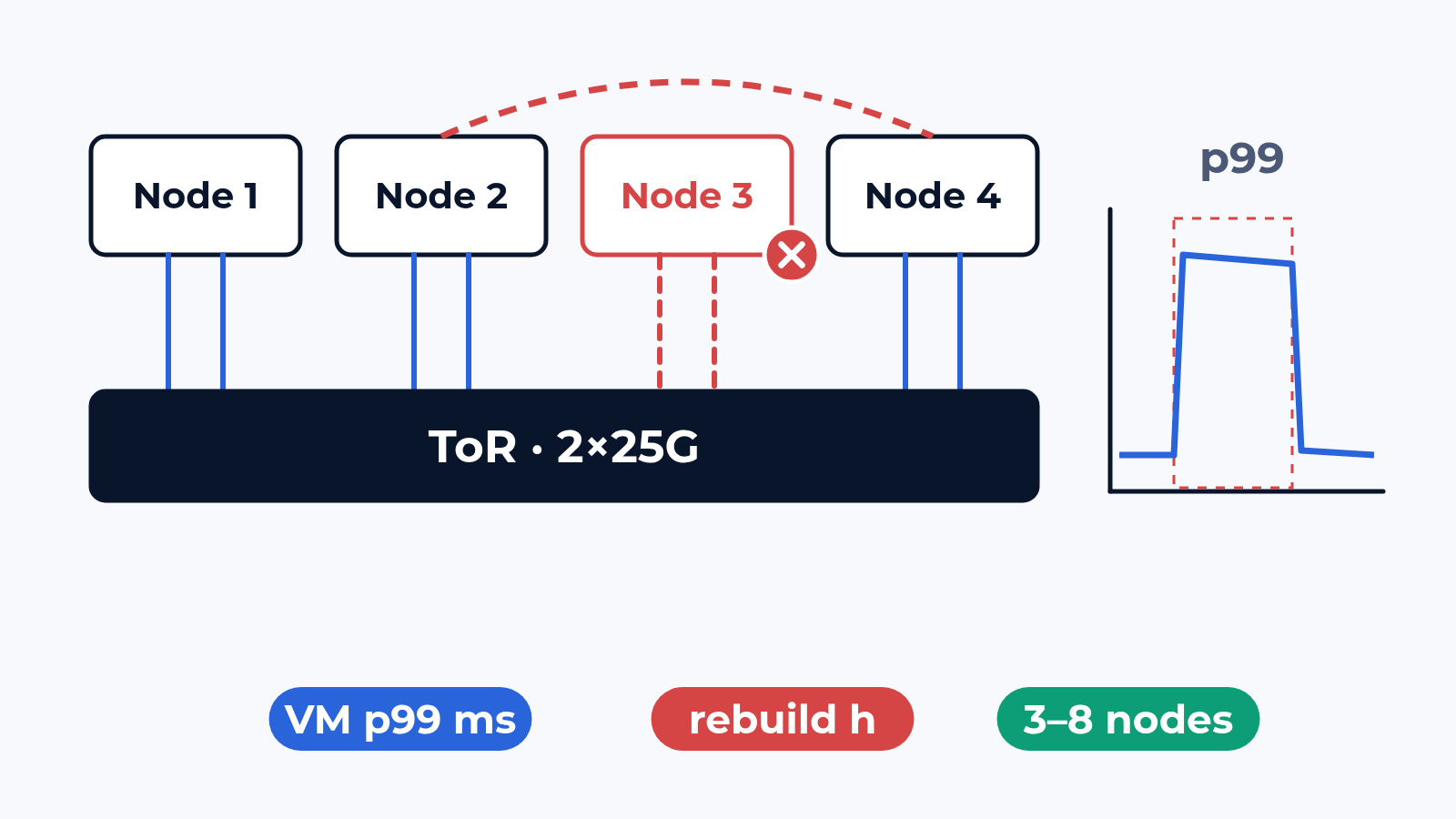
An HCI sizing sheet answers one question: how many VMs fit on 4 nodes with one node in reserve. It is calculated on a healthy cluster. A buyer reads "N+1" and expects a lost node to cost a quarter of the capacity. In practice the surviving nodes rebuild the lost copies over the same 25G uplinks that carry VM traffic and every replicated write. We measure two numbers: VM I/O latency p99 through each event, and the time until the data is fully protected again.
The bench
The cluster is yours: 3 to 8 nodes in the rack, or the software on the lab hypervisor. Each node gets 2 uplinks of 25G, as breakout from 100G ports, to the ToR pair with your config export: VLANs for VMs, storage, live migration and management, MTU, LACP, the QoS map. The storage layer runs as you plan it: replication factor or erasure coding, rebuild priority, fault domains.
Load VMs on every node drive your I/O profile: block sizes, read and write mix and queue depth from your workload statistics, on a data set filled as you expect it in a year. Generator ports put the application traffic on the same uplinks. Latency is logged per VM, switch counters per port and queue, so node-to-node traffic shows apart from VM traffic.
What we check
- Baseline: VM I/O latency p50 and p99 per block size on a healthy cluster, with the VM count stepped up until p99 crosses your criterion
- East-west: replication and VM traffic per uplink, and the VM count at which a 25G link saturates before the disks do
- Node loss: a node powered off with I/O running; the stall per VM from the last completed I/O to the first one back, and when that node's VMs run again elsewhere
- Rebuild: the time until every copy is restored, and VM p99 through all of it, at the rebuild priority you plan and one step lower
- Resync: the node comes back mid-rebuild; how long the catch-up takes and what it does to latency
- Maintenance mode and rolling upgrade: node by node, VMs moved by live migration, the resync before the next node, the total window
- Uplink failover: one 25G link, one NIC port or one ToR taken down; the stall, and whether the cluster mistakes it for a lost node
HCI is one of 5 device classes on the storage page; the fabric to an external array is covered in how we test storage networks.
What usually breaks
Rebuild on the VM uplinks. In a typical project a 4-node cluster loses a node, and the rebuild starts at full speed over the same 2×25G. VM write latency p99 goes from 3 ms to 45 ms and stays there for the 2 h 40 min of the rebuild; database VMs time out long before the data is safe. With storage in its own class on the ToR and the rebuild priority one step lower, p99 stays under 9 ms and the rebuild takes 3 h 50 min. The owner picks one, with both numbers on the table.
An uplink failover that looks like a lost node. The storage VLAN runs MTU 9000 on hosts and host ports, the link between the two ToRs stays at 1500. Everything works until one uplink drops and storage traffic crosses that link. Small heartbeats pass, large replication frames do not, and after a timeout the cluster declares a healthy node's copies lost and rebuilds them for nothing. One line of switch config, found in the first failover case.
A rolling upgrade longer than the window. The plan says 30 minutes per node. Each node means VMs moved off, the update, then a resync of everything written meanwhile, and the next node waits for it. On 6 nodes under business load the window in a typical project grew from the planned 3 hours to 7. During every resync the data has one copy less, a risk the platform team should see in hours.
What is in the report
VM I/O latency p50 and p99 per block size and VM count on a healthy cluster, and as a curve through each event. The stall per VM for every failure. Rebuild, resync and upgrade time per event and per setting. Traffic and drops per uplink and queue, storage apart from VM traffic. Config exports of the nodes and the ToR pair for every run, with the config line behind each missed criterion.
Where to start
Send us the node count, the HCI software and the switch plan. We answer with a draft test plan: the items, the bench layout and the dates. The report is yours to keep and to show to the vendor. Write to us or look at what else the bench does.
 Alexander Zemskov
5 min read
Alexander Zemskov
5 min read
 Alexander Zemskov
4 min read
Alexander Zemskov
4 min read